Runwork

Make your team actually good at AI.

Most teams bought AI tools. Runwork sets people up so they actually use them, keeps what they build in one shared workspace, and shows you who is getting better.
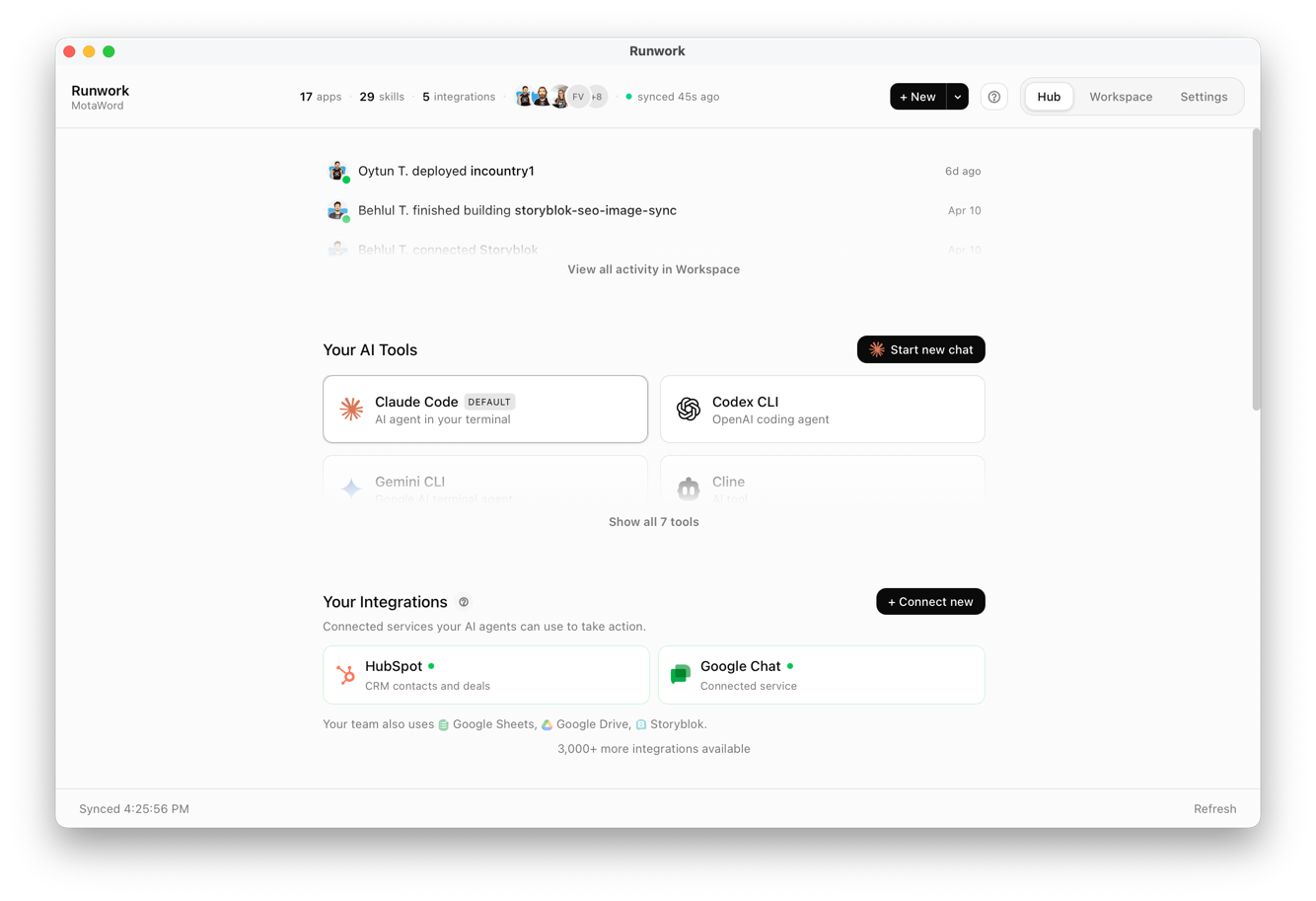
Runwork Desktop app

Teach your AI once. Everyone's AI knows it.

Teach your AI to do something, and it shows up in every teammate's AI. Build an automation, and it keeps running for the team even when your laptop is closed. Everything you build adds up in one shared cloud, ready for whoever needs it.

It works the same across every AI your team uses.

Claude Claude
ChatGPT ChatGPT
Cursor Cursor
Codex Codex
Gemini Gemini

Windsurf Windsurf
Cline Cline
Antigravity Antigravity

Your team has AI tools.
It's not AI-native yet.

You gave everyone a ChatGPT account. One engineer picked up Claude Code, someone else tried Cursor last week, and none of it connects. Three laptops, no shared context.

When one of them figures out a prompt that works or a workflow that saves an hour, it stays on their laptop. Nobody else can use it.

You have no idea what anyone is actually doing with AI, or whether any of it is working. And every week a new tool shows up that someone asks about.

It is not your team's fault. The missing piece is shared capability: setup, company context, skills, workflows, and a way to see what is changing. That is the part Runwork gives you.

One person figures it out. The whole team gets it.

Most teams have plenty of AI and none of it adds up. The skill someone sets up, the automation that saves an hour, it usually stays with that one person. Runwork shares it with the whole team.

  1. Someone figures out the right way to write up your meeting notes. Save it as a skill, and everyone runs it from their own AI.

    Explore skills
  2. Slack, Stripe, HubSpot, Gmail, a few thousand others. All of it usable from your team's AI.

    All integrations
  3. Hand off the weekly report. It keeps running at 2am whether your laptop's open or not.

    See automations
  4. Ask for an internal tool and your AI builds one. Runwork runs it, and the team opens it in the desktop app or the browser.

    See team apps

Runwork · Skills
All 12 My Skills 4 Community 91K+ App Skills 8
WR
weekly-report custom
Pulls last week's numbers from Stripe and HubSpot, posts the weekly brief to #team-updates.
LA
lead-audit app
Scans HubSpot for unqualified leads and routes them by industry.
QD
quote-drafting custom
Drafts translation quotes from a client brief plus Stripe pricing tiers.
CB
campaign-brief custom
Generates campaign briefs in Brightline's tone of voice.
Runwork · Integrations
Search integrations...
HubSpot
HubSpot
Used by Sarah, Mike
Slack
Slack
Used by Mike +3
Stripe
Stripe
Connected
Notion
Notion
Used by Ravi +1
Airtable
Airtable
Available
Jira
Jira
Available
Showing 6 of 3,200+
Runwork · Automation
process-quote
4 steps · runs on Gmail webhook · avg 14s
Running
Receive request
Gmail webhook
Complete
Extract details
AI · Claude
Complete
Price and draft
Stripe · PDF
Running
Send to client
Gmail · SendGrid
Queued
Ran 12 times today · last 4m ago
Runwork · Apps
MY APPS
6 apps in your workspace
Recent Popular Trending Starred
Lead ROI Auditor
Tracks HubSpot pipeline to closed deals by source.
12
MA
SC
JK
Shared with Mike, Sarah, Jamie +3
Client Onboarding Tracker
Custom form with status emails for each stage.
4
SC
MA
Shared with Sarah, Mike
Weekly Team Brief
Posts every Monday to #team-updates.
8
Shared with everyone (12)

Set up the team without turning it into a project.

Choose the AI tools your team should use, add your company context once, and invite people. Runwork handles setup and sync, then gives each person a first useful AI moment. Setup does not have to start with IT tickets or a policy meeting.

  1. Choose the AI tools each role should use, and change them anytime.

    Manage your team
  2. Tell Runwork about your company once. It syncs that context to every agent your team uses.

    Team instructions
  3. Send invites from the dashboard. Each teammate downloads the Desktop app and walks through onboarding.

    See the Desktop app
  4. Runwork finds ChatGPT, Cursor, Claude, and whatever is already there. It installs what is missing.

    How detection works
  5. Everything the team has set up appears inside each person's agent. Nobody has to copy files around.

    How sync works
  6. Each teammate's AI starts with your company context, team skills, and approved tools already in place.

    What teammates get on day one
Runwork · Workspace setup
Approved AI tools
Select which AI tools your team should use, configure their settings, and set team-wide instructions.
Claude Desktop Configured
Cursor
Claude Code Configured
Gemini
Runwork · Team instructions
Team instructions
Synced to every configured agent during setup. Supports markdown and agent-specific rules.
# Brightline Supply We sell compliance training to healthcare teams. CRM in HubSpot, payments in Stripe, docs in Drive. ## Tone Plain and specific. Use short sentences. ## When drafting outbound - Check the HubSpot pipeline first - Use Stripe actuals, not estimates - Default to the weekly-report skill
Inbox
Welcome to Brightline Supply on Runwork
RW
Runwork · invites@runwork.ai Now
Hi Sarah,
You've been added to Brightline Supply's Runwork workspace. Download Runwork Desktop to finish setup. It will detect your AI tools, connect them to the team workspace, and sync the skills your teammates have already built.
Download Runwork Desktop
Available for macOS · Windows · Linux
Mike, Marketing lead
Runwork · Desktop
Here's what we found
Scanned your machine for AI tools and the apps they can connect to.
Claude Code
AI agent that works in your terminal
Found
Cursor
An editor where AI writes code alongside you
Found
ChatGPT
Already signed in on this machine
Found
Your desktop apps
Slack
Slack
Desktop app · Applications/
Detected
Notion
Notion
Desktop app · Applications/
Detected
Google Drive
Google Drive
Drive for desktop · Applications/
Detected
Team · Sync status
Workspace synced
24 skills · 12 integrations · 7 automations
3 of 4 active
MA
Mike Adams
Synced 2 minutes ago
Active
SC
Sarah Chen
Synced 8 minutes ago
Active
RP
Ravi Patel
Synced 27 minutes ago
Setup complete
JK
Jamie Kim
Invited · not installed yet
Joined
Runwork · Desktop
S
Sarah
What happened while I was out?
Claude · via Runwork
The Acme proposal is overdue, 12 new support tickets came in (2 urgent), and yesterday's report didn't run. Want me to rerun it?
HubSpot Gmail via team skill · daily-briefing

Your team gets better at AI. You can see where.

Training starts during setup and keeps going, so the team keeps getting better as AI itself changes. Each person gets practical next steps for their role, and you get one dashboard showing who is moving, who is stuck, and what changed.

  1. Every teammate gets a map of what they can do today, what to try next, and which habits are starting to fade.

    See the journey
  2. Each person gets one useful next step. You see who received it and whether anything changed afterward.

    Adoption and training
  3. Runwork notices patterns in your work, like a report you keep pulling by hand. It suggests a skill or workflow through your own AI, so the work stays on your machine.

    Adoption and training
  4. See adoption scores, who is using AI for real work, and who needs help, like "Sarah uses AI daily but has not built anything yet."

    Explore the dashboard
Runwork · My Journey
Your AI journey
Where you stand, what's next
68
your score
Your capability map
Connect an AI tool Use a skill Connect an integration Build a workflow Build an app Model data
Mastered Ready next Upcoming
Your next step
Build a workflow for a repeated task that can run by itself.
Inbox · Weekly coaching
Brightline Supply · Monday brief
Last 7 days
AI messages
1,284
+18%
Skills run
147
+42%
Built
6
needs lift
Do next
Share the weekly-report skill with Ops
Check in with Jamie (idle 4d)
Approve Codex for engineering
Runwork · Desktop
Reflection
Private · your own AI
Noticed in your work
You did the same report by hand 3 times last week
Your AI caught the pattern on its own. Save it once. It runs for you and the whole team.
Mon Wed Fri the weekly report
Team · Adoption dashboard
Brightline Supply
Team AI score · this week
54
Growing
Setup
91
Strong
Usage
72
Strong
Building
15
Starting
Knowledge
38
Starting
12 members · 3 active today
+8 this week
Sarah uses AI daily but hasn't built anything yet. Nudge her.

AI tools change every week. Your team should not restart every time.

Runwork tracks what is new, gives people practical next steps, and syncs your shared capability to new agents when they show up. The tools can change. The team's work keeps compounding.

Weekly
Leader digest
New tools worth trying, what your team did with AI this week, and where to push next.
Daily
Tips in the Desktop app
Each teammate sees one useful next step, based on how they worked yesterday. It learns as they go and stays out of the way.
Automatic
New agents, same workspace
When a new AI tool ships, the work your team has built syncs to it. You do not start from a blank setup.

Works with Claude, Cursor, ChatGPT, Codex, Windsurf, and the next thing your team wants to try.

Make your team
actually good at AI.

Set up the workspace, invite your team, and start seeing who is using AI for real work. Free to start, no credit card.